
7
Apr
How Do I Optimize a Video for Smoother Editing?
Written by on in Video Editing Basics .
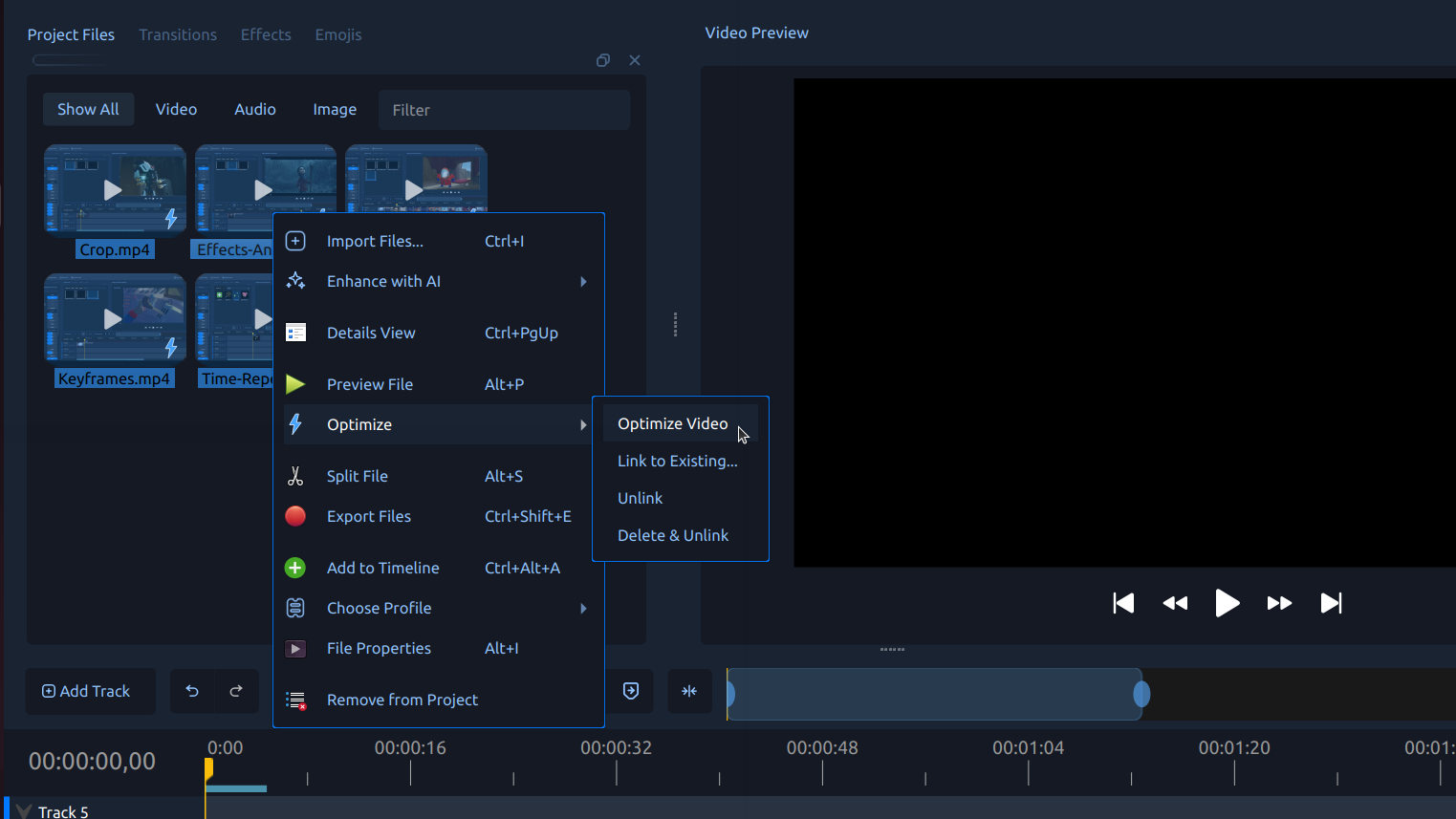
Optimizing a video creates a smaller, faster version for editing, so playback, scrubbing, trimming, and previews feel smoother without changing your final export quality.
Optimizing a video is used when your original clip is large, high-resolution, or difficult to preview smoothly during editing. Instead of editing directly with the full source file, OpenShot can create a lighter version that is faster to decode and easier to work with. This is sometimes referred to as proxy editing, but OpenShot calls it Optimize for clarity and ease of use.
What does “optimize a video” mean in OpenShot?
When you optimize a video, OpenShot creates a smaller, faster version of the original clip for use during editing. This optimized version acts as a proxy video, helping improve playback, scrubbing, trimming, and preview responsiveness, while your final export still uses the original full-quality file.
How to optimize a video in OpenShot
- Import your video. Add your media file to the Project Files panel.
- Right-click the file. In the Project Files panel, right-click the video you want to optimize.
- Choose Optimize → Optimize Video. OpenShot will begin creating an optimized editing version of the selected clip.
- Wait for processing to finish. OpenShot shows progress directly on the file thumbnail while the optimized video is being created.
- Edit with smoother previews. Once complete, OpenShot can use the optimized version during editing while keeping the original file for export.
Tip: Optimizing is especially helpful for 4K video, screen recordings, and clips that feel choppy during preview playback.
Try it in OpenShot
If your project feels slow or preview playback is choppy, try Optimize Video in OpenShot. Download and install OpenShot Video Editor (free and open-source), optimize one of your clips, and compare the editing experience before and after. It is one of the easiest ways to make demanding projects feel smoother without changing final export quality.