
6
Huh
OpenShot 3.5.1: Nopeampi Suorituskyky, Sulavampi Editointi, Paremmat Esikatselut
Kirjoittanut päivämäärä kategoriassa Julkaisut .
OpenShot 3.5.1 tekee editoinnista nopeampaa, sulavampaa ja entistä viimeistellympää. Se lisää sisäänrakennetun Esikatselun Optimointi -työnkulun sulavampaan editointiin, parantaa suorituskykyä ja reagointikykyä, päivittää aikajanan zoomauksen ja trimmaamisen sekä tuo mukanaan pitkän listan tärkeitä korjauksia ja käytettävyyden parannuksia. Lataa OpenShot 3.5.1 nyt!
Tämä merkintä on saatavilla vain englanniksi.
Highlights
- Optimize Preview — a new built-in proxy workflow that creates or links optimized preview media for smoother playback, scrubbing, trimming, and editing on demanding footage.
- Faster performance — smarter CPU-aware thread defaults, better thread controls, faster media inspection, and improved responsiveness across editing workflows.
- Smoother timeline editing — improved zooming, better playhead-centered zoom behavior, smoother interaction, and better multi-selection trimming and re-timing.
- Sharper previews — faster preview dialogs, improved autoplay behavior, better resizing quality, and optimized media support in preview-related tools.
- Better AI workflows — enhanced ComfyUI tools with depth, lines, reference-image support, and improved Change Video Style workflows.
- Cleaner interface polish — improved thumbnails, synced title thumbnails after edits, and a new User Interface Scale setting.
- More fixes and stability — important fixes for timeline scrolling, razor alignment, title refresh behavior, media handling, crashes, and regressions.
OpenShot 3.5.1 Makes Editing Faster and Smoother
OpenShot 3.5.1 is not just a maintenance update. It is a workflow release focused on the parts of editing that matter most every day: responsiveness, smoother previews, faster visual feedback, cleaner timeline interaction, and better control over large or demanding projects. The result is a release that feels faster, more polished, and more capable from the moment you start editing.
1. Optimize Preview: OpenShot’s New Built-in Proxy Workflow
The biggest new feature in OpenShot 3.5.1 is Optimize Preview. This adds a built-in workflow for creating or linking lower-resolution preview files, making it easier to work with large, high-resolution, or demanding video clips during editing.
Instead of forcing every preview, scrub, trim, and dialog to rely on full-resolution source media, OpenShot can now use optimized preview files where available. This helps playback feel smoother, makes timeline work more responsive, and improves the editing experience on real-world footage. Final exports still use the original media, so users get a faster editing workflow without sacrificing output quality.
This is one of the most important upgrades in the release because it changes what kinds of projects feel practical to edit smoothly inside OpenShot.
2. Faster Performance and Smarter System Scaling
Performance is a major theme of 3.5.1. OpenShot now does a better job adapting to the user’s hardware, with CPU-aware default thread settings, improved thread controls, better limits on manual overrides, and more useful system/version information for debugging and support.
Under the hood, media inspection and thumbnail-related work have also been improved so OpenShot no longer has to decode everything at full resolution just to inspect or preview it. That means less wasted work and a faster-feeling editor overall.
These improvements are especially important because they respond directly to real user feedback around performance and help OpenShot behave better across a wider range of systems.
3. A Smoother, More Intuitive Timeline
OpenShot 3.5.1 also improves one of the most important parts of any video editor: the timeline. Zooming behavior has been refined to feel more natural and keep the playhead better centered. Smooth zoom interaction has been improved, and timeline behavior is more consistent when navigating complex edits.
Multi-selection trimming and re-timing have also been improved, making it easier to resize groups of aligned clips while keeping their relationships intact. This is especially useful in stacked edits, synchronized layouts, and more structured timeline work.
Together, these changes make the timeline feel more predictable, more responsive, and easier to control.
4. Sharper Previews and Cleaner Visual Feedback
Preview-related tools received meaningful upgrades in 3.5.1. The preview dialog opens faster, plays back more smoothly, behaves better with autoplay, and handles resizing more cleanly. When optimized preview media exists, OpenShot can also use it in preview-related workflows for better speed and responsiveness.
Thumbnail generation and presentation were improved as well. Thumbnails are cleaner, more modern, and easier to read at a glance, with a simpler look for videos and better consistency across media types. Title thumbnails also stay in sync more reliably after edits.
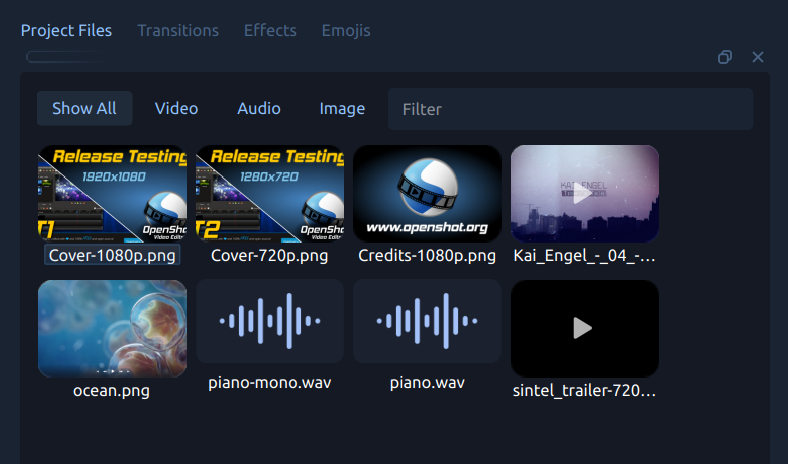
These changes may sound small individually, but together they make the editor feel noticeably more polished.
5. Better AI-Assisted Creation with ComfyUI
OpenShot 3.5.1 continues expanding its advanced AI-assisted workflows through ComfyUI. The Change Video Style workflow now has stronger controls, including support for depth, lines, and reference images, helping users guide results more effectively.
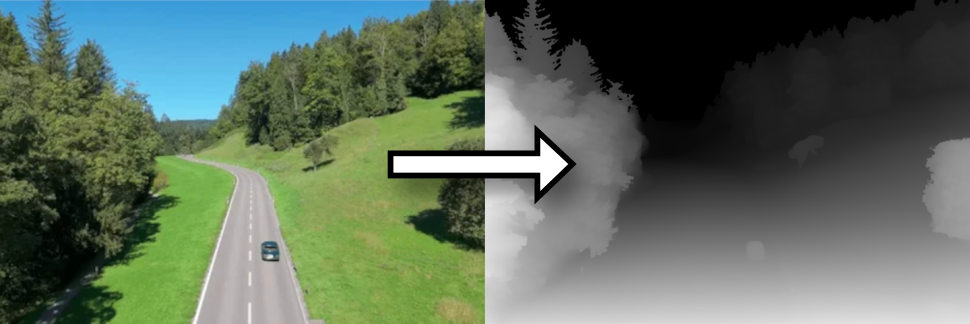
The following video demonstrates how OpenShot can take a low resolution/low fidelity simulation of a car drive, extract the depth and lines, and generate multiple videos, controlled by a prompt and reference image. The car and environment can change, but the camera and motion are anchored to our source video's depth and lines. NOTE: This all runs on open-source models, and uses no API calls.
The release also adds new extraction workflows such as Depth and Lines, along with improved setup guidance for advanced ComfyUI use. For users exploring stylized, AI-assisted, or experimental editing workflows, this release offers more control and a stronger foundation.
6. More Polished and Customizable Interface
OpenShot 3.5.1 includes a number of user-interface improvements that help the application feel cleaner and more adaptable. One especially welcome addition is a new User Interface Scale preference, which makes it easier to adjust the size of the OpenShot interface for different displays and comfort levels.
This release also improves translation coverage, refreshes documentation strings, and continues refining the modernized timeline and thumbnail presentation. Altogether, these changes help OpenShot feel more accessible, more consistent, and more ready for a wide range of desktops and workflows.
7. Important Fixes, Stability Updates, and Release Polish
Alongside the headline features, OpenShot 3.5.1 includes many important fixes and quality improvements. Timeline scrolling behavior was corrected, razor alignment was fixed so cuts match the expected visual position, and title thumbnails now refresh correctly after edits. The release also includes stability work around media handling, crash prevention, cache safety, compatibility, translation validation, and automated tests.
This kind of release polish matters. It makes the editor more dependable, improves confidence in day-to-day use, and helps the new workflow features land on a stronger foundation.
Why 3.5.1 Matters
OpenShot 3.5.1 is more than just another update. It is a meaningful step forward for free, open-source video editing. This release makes OpenShot faster, smoother, and more capable where it matters most: real projects, real workflows, and real creators. From optimized previews and better timeline behavior to cleaner visuals and stronger AI-assisted tools, 3.5.1 helps remove friction from the editing process so people can spend less time fighting software and more time creating.
Support Free, Open-Source Video Editing
If OpenShot has helped you create, learn, or share your story, please consider supporting the project with a donation. Monthly PayPal subscriptions help make this work sustainable and directly support continued development, fixes, new features, and future releases.
OpenShot 3.5.1 is available now. Download the latest release and see what is possible with faster editing, smarter previews, smoother workflows, and a free, open-source video editor that keeps getting better.
Download OpenShot 3.5.1
I also want to give a heartfelt thank you to Raffi for tirelessly advocating for the community, triaging bug reports, helping users find answers, and bringing invaluable feedback into the release process.